How to Get Your Delta Executor Key on Android & iOS (2026 Guide)
Delta Key is the one thing standing between you and running scripts in your favorite Roblox games. If you have just installed Delta Mobile Executor and are staring at a blank key window with no idea what to do next, you are in the right place.
A lot of new users get stuck at this exact step. The key process is not complicated, but if you have never done it before, it can feel confusing. This guide breaks the whole thing down in plain, simple steps for both Android and iOS. So you can get your key, paste in it, and start execution without any frustration.
By the end of this guide, you will know exactly how the Delta key system works, how to get your key on any device, what to do if something goes wrong, and how to skip the key process entirely if you prefer.
What Is the Delta Key and Why Does Delta Executor Require It?
The Delta key is a daily verification code that you need to enter before using Delta Mobile Executor. It works as a security checkpoint that confirms you are using the real, official version of Delta and not a fake or modified copy.
Every key is unique to your session and expires after 24 hours. That means you will go through this process once per day. It sounds like extra work, but it takes just a few minutes once you know the method and it is a big part of what keeps Delta stable, safe, and working reliably for all users.
Without a valid key, Delta will not allow you to run any scripts. So getting it right is the first and most important step.
How to Get Delta Key on Android (Step-by-Step)
Getting the Delta Android Key system done is simple. Follow these steps one by one and you will have your key in under five minutes.
- Step 1: Download and install Delta Mobile Executor from the official website (getdelta-executor.com). Make sure you always use the latest version to avoid errors.
- Step 2: Launch Delta on your Android device. When it opens, a window will appear asking you to enter your key.
- Step 3: Tap the Receive Key button. When you do, a link will be automatically copied to your clipboard.
- Step 4: Open your browser (Chrome works best) and paste the link into the address bar. Hit search.
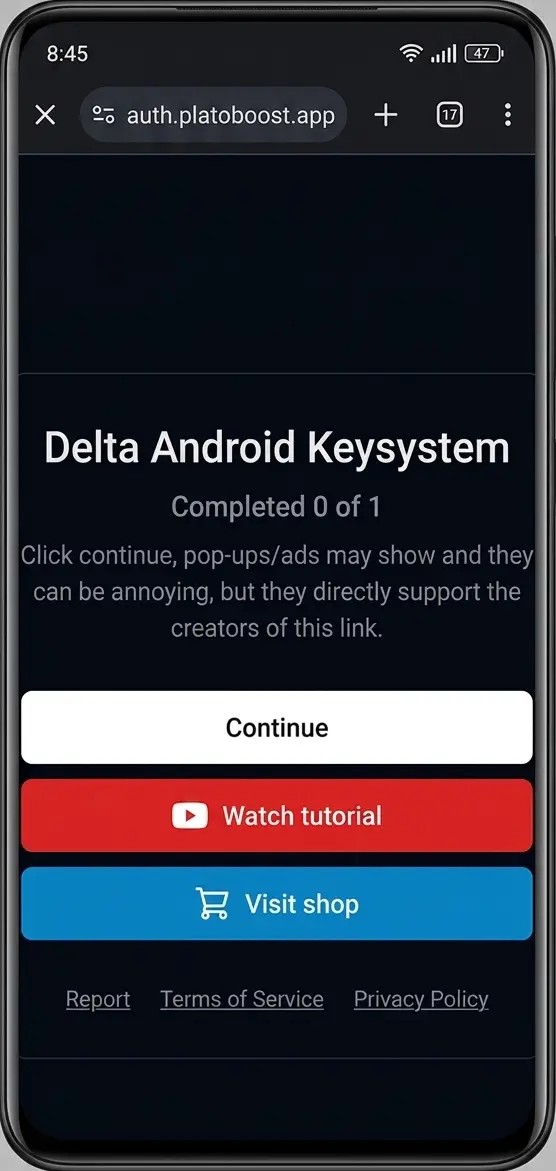
- Step 5: The Delta Android Keysystem will load. Click on the Watch Tutorial button, then press the back arrow to return to the same key page.
- Step 6: Now click the Visit Shop button, then come back to the key page again.
- Step 7: Tap the Continue button to move forward.
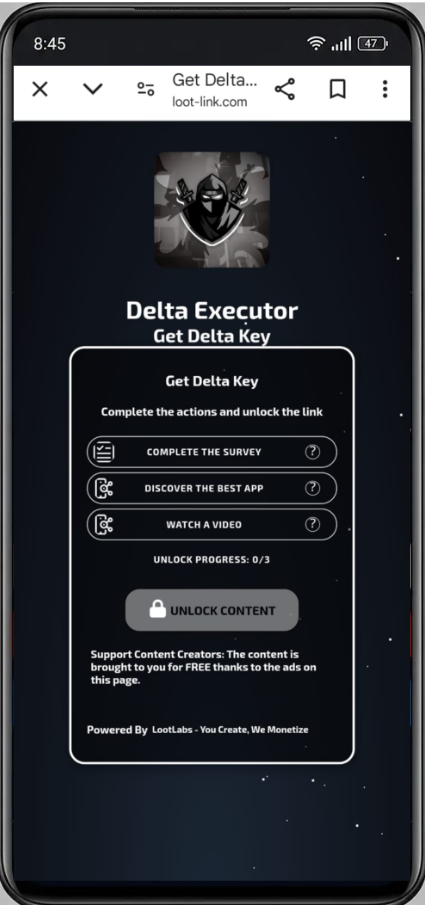
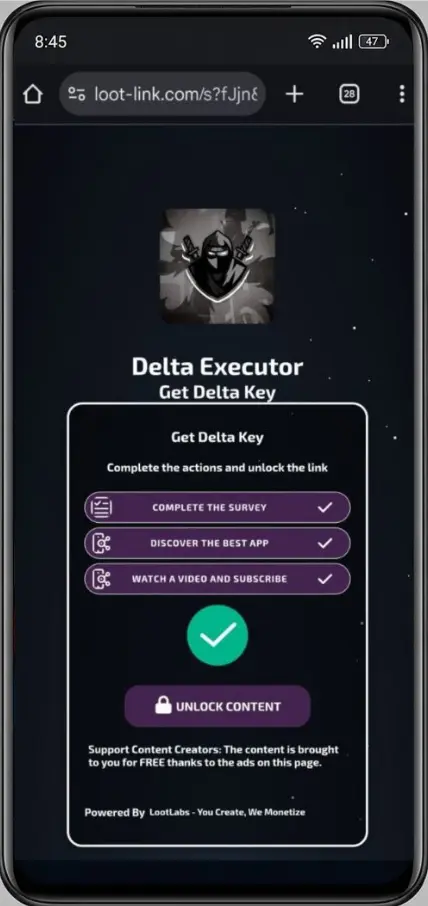
- Step 8: You will now see a list of tasks, each with a "?" icon next to it. Tap each one. A countdown timer will appear, then wait for it to hit zero. A green tick will appear once it is done.
- Step 9: Once all green ticks are visible, tap Unlock Content.
- Step 10: You will now see a Create Key option. Tap it to generate your unique key, then tap Copy.
- Step 11: Go back to the Delta app, paste the key into the key window, and tap Continue. That's it, you now have full access to Delta.
⚠️ Important: Do not download anything that pops up during the key process. Just complete the tasks shown and ignore all pop-up ads.
How to Get Delta Key on iOS Device (Step-by-Step)
The process for getting the Delta key on iOS device is very similar to Android, with a couple of small differences. Here is how it works on iPhone and iPad:
- Step 1: Download and install Delta on your iOS device. If you haven't done this yet, visit the official Delta site and use the Direct Install option.
- Step 2: Open Delta. A prompt will appear asking for your key. If you already have one, paste it and tap Continue. If not, tap Receive Key.
- Step 3: A link will be copied to your clipboard. Open Safari (not Chrome or any in-app browser) and paste the link into the address bar. Tap Go.
- Step 4: The Delta iOS Keysystem window will appear. Tap the Continue button.
- Step 5: Unlike Android, you may be asked to complete a short set of tasks on Linkvertise. Follow each step shown on the screen carefully.
- Step 6: Once all tasks are complete, you will receive a success message confirming your executor has been whitelisted.
- Step 7: Copy the key that appears, go back to Roblox, paste the key into the Delta key window, and tap Continue.
You now have full access to Delta on your iOS device.
💡 Tip for iOS users: Always use Safari to complete the key process. In-app browsers from apps like Discord or Telegram can cause the key page to load incorrectly or not at all. Also make sure any ad blockers are turned off before you start.
Delta Key Not Working? Common Fixes
A lot of Delta exploiters run into small issues during the key process. Here are the most common problems and how to fix them quickly:
- Key page not loading - Turn off any ad blockers and try opening the link in Chrome or Safari directly instead of an in-app browser.
- Countdown not reaching zero - Be patient. Sometimes the countdown takes a little longer on slower connections. Make sure your internet is stable before starting.
- Gateway time-out error - This is a server-side issue, not a problem with your device. Wait a few minutes and try again.
- Key expired - Delta keys last 24 hours. If yours has expired, simply go through the key process again to generate a fresh one.
- Wrong version of Delta - An outdated version of Delta can cause key errors. Always download the latest version from the official site.
- Key not accepted - Make sure you are copying the full key without any extra spaces. Paste it carefully and tap Continue.
How to Use Your Delta Key to Run Scripts
Once you have your key delta executor entered and verified, running scripts is easy. Here is a quick overview of what to do next:
- Step 1: Open Delta and launch the Roblox game you want to script in.
- Step 2: Once the game loads, tap the Delta icon to open the executor panel.
- Step 3: Tap GUI to open the full interface, then tap the Controller icon to open the script window.
- Step 4: Either paste your own script for delta executor or browse the built-in Script Hub to find a ready-made script delta executor for your game.
- Step 5: Tap Execute or Run and your script will start working inside the game immediately.
Some of the most popular scripts users run with Delta include grow a garden script for automating farming and harvesting, pet spawner script grow a garden for managing pets automatically, Blox Fruits auto-farm scripts, and Pet Simulator X coin and egg scripts. The Script Hub inside Delta is updated regularly, so new scripts for trending games are always being added.
Frequently Asked Questions
How long does the Delta key last?
The Delta key expires every 24 hours. Once it expires, you will need to go through the key process again to generate a new one. If you want to skip this daily step, upgrading to Delta Executor Premium removes the key requirement entirely.
Can I use the same Delta key on multiple devices?
No. Each Delta key is tied to your specific session and device. If you switch devices or reinstall the app, you will need to generate a new key for that device.
Why is my Delta Mobile key not working on iOS?
The most common reason is using the wrong browser. Always open the key link in Safari on iOS. In-app browsers often block parts of the key page from loading correctly. Also make sure your ad blocker is turned off and that you are using the latest version of Delta.
Is there a way to bypass the Delta key system?
Yes. The easiest and safest way to bypass the key system is by upgrading to Delta Executor Premium, which removes the key requirement for all future sessions. There are also third-party link bypasser websites available, but for safety and reliability, Premium is always the better option.
Does the Delta key system work the same way on Android and iOS?
The process is very similar on both platforms, but there are a few small differences. Android users go through the key steps inside a standard browser, while iOS users may be asked to complete additional tasks on Linkvertise via Safari. Both processes take just a few minutes once you know the steps.